

Make the prologue battlefield readable: Grid, HP bars, portraits, and danger rangesMinor spoilers
Enable the grid, HP bars, and portraits, and darken the danger overlay. Use prologue training to learn threat displays, terrain, and counterattack range.
Original video: “Fire Emblem: Fortune's Weave — First playthrough, Prologue” | JeM_TraDer | Watch the original video
I chose Hard/Classic, set appearance and name, then entered prologue training. Clear grid lines, HP bars, portraits, and danger ranges make distance and enemy reach easier to read.
Set appearance before prologue training
You can change hairstyle, hair color, armor, and cape. I kept white hair and a cape, then set the name. There is also a switch for certain enemies' appearance if you dislike their original look.
Prologue training requires defeating all enemies, while your custom character's defeat causes failure. Follow the training to learn basic actions instead of rushing to skip it.

Make the grid and danger ranges clear
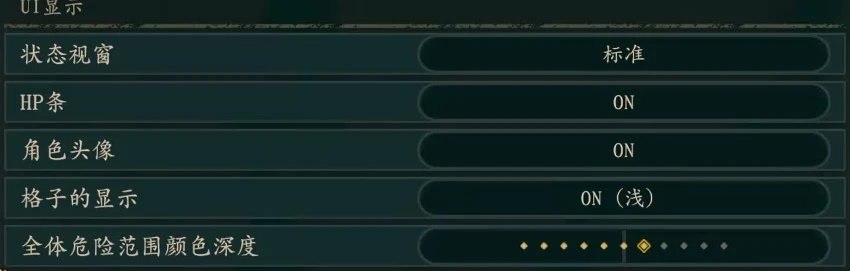
After entering prologue training, increase general speed, keep hold-to-skip enabled, turn on HP bars and portraits, and use the standard status window.
Enable the grid and darken danger-range display. The 3D map can distort my sense of distance; unclear tiles can lead to counting steps incorrectly.
Do not enable every assistance option at once. Try moving around before deciding whether the minimap should rotate, adjusting it to how you read the map.
Use terrain to avoid enemy counters
Select a unit with the cursor to inspect weapons, Movement, and proficiencies, then try the threat display shortcut. Reveal enemy attack ranges first, move onto favorable terrain, check the forecast, and find positions where you can attack without a counter.
The tutorial gradually explains terrain and counterattack range. Learn these displays while enemy numbers are small. Later, on larger battlefields, the same information determines who can advance and who should stay back.
